


Before you delete a Jira group, find out what it grants
Also published on Atlassian Community
In this guide
Before: a tidy up. Your identity provider sync created dozens of groups over the years, and old-contractors looks unused. You delete it in Atlassian Administration. After: a team lead messages you the next morning. Three people can no longer open their space. Nobody knows which permission the group held, because the audit log only says that a group was deleted.
ConfigRadar is a configuration change history app for Jira Cloud from Radrly. This guide covers both sides: what to check before you delete a group, and what you can and cannot reconstruct afterwards. The native part comes first.
What deleting a group does
Atlassian's Delete a group page is direct about it: before you delete a group, check whether it is used to configure permissions in any of your apps. If people still need those permissions, don't delete it. If they don't, consider removing the permissions first, because a group created later with the same name could otherwise pick them up automatically.
When the group goes, Jira drops its grants in permission schemes and its place in space roles. The audit log records the deletion but not those removals. That gap is open as JRACLOUD-97961, which also notes that recreating the group does not restore access, because the new group is a new entity.
Before you delete: a native checklist
- Permission schemes. Go to Settings > Work items > Permission schemes and open each scheme in use. Search the page for the group name. Write down each permission it holds.
- Space roles. The group can be an actor in a space role in any space. There is no site wide list of role members, so check Space settings > People in the spaces you suspect. Atlassian's page on viewing space role usage shows where a role is used, not who is in it.
- Global permissions. Check Settings > System > Global permissions.
- Notification schemes, work item security levels, filter and dashboard shares. Groups appear in all of these.
- Faster for many schemes: the REST call
GET /rest/api/3/permissionscheme?expand=permissionsreturns every grant, so you can search the JSON for the group name. - Remove the grants on purpose, and only then delete the group.
After the fact: what you can rebuild
If the group is already gone, the native options are thin:
- The audit log shows the deletion and its time. Atlassian notes that the Author field is missing for user management changes, so you may not even see who did it.
- If you exported the audit log or the schemes earlier, you can compare with that copy.
- Otherwise you ask the space admins what used to work.
Where ConfigRadar fits
ConfigRadar takes a daily snapshot of 14 configuration object types, including permission schemes, space role actors (the people and groups in each role) and groups. It compares each snapshot with the previous one and records every difference as a change, next to the audit log entries it imports every hour.
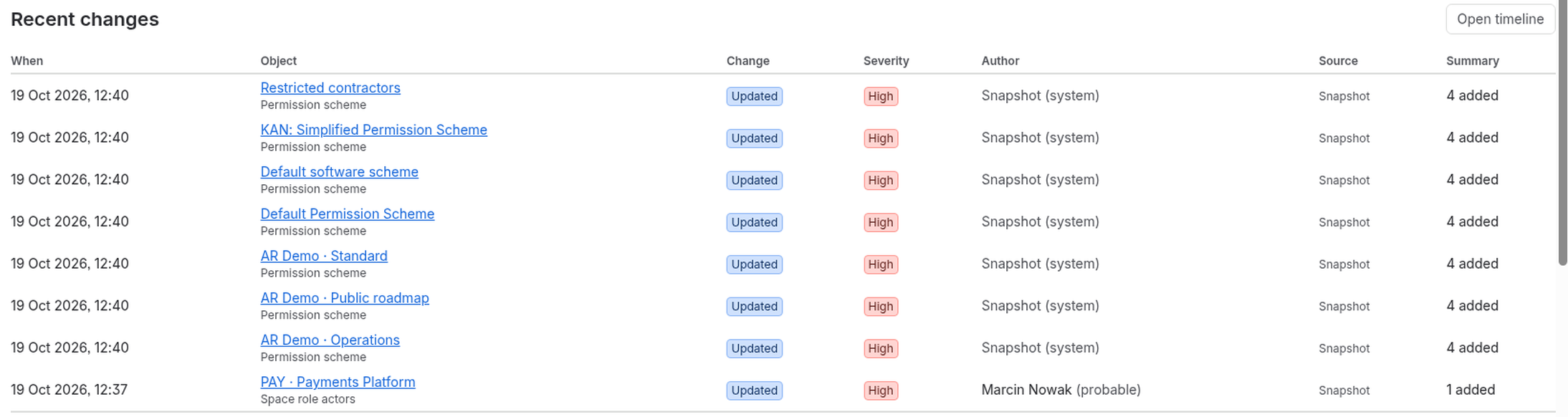
So for this scenario:
- Before deleting, check the Overview for the last snapshot date so you know the schemes and roles are already on record. Snapshots run once a day, so if today's has not run yet, wait for it or note that you are relying on yesterday's state.
- After deleting, the next snapshot shows each affected scheme and role as a change. Permission scheme diffs list each grant as the permission and its holder, for example "Browse spaces: Group old-contractors", marked Removed. Groups and space roles appear by name.
Open the change and find How to revert: a numbered list of up to 20 steps, each with the Jira admin path and, where useful, a value with a Copy button. ConfigRadar never changes Jira itself. You recreate the group and add the grants back, following the list.
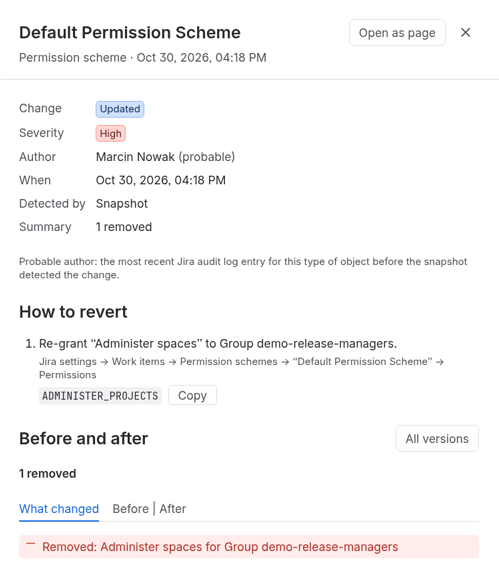
All of this is in Standard. Advanced adds alerts as Jira work items for watched schemes and baselines, so you can compare the current state with an approved one.
Two limits. Snapshots run once a day, so a group created and deleted between snapshots leaves only the audit log record. And the history starts at install, plus 30 days of imported audit log.
Quick answers
What happens when you delete a Jira group?
Jira drops the group's grants in permission schemes and its place in space roles. The audit log records the deletion but not those removals, and recreating the group does not restore access (JRACLOUD-97961).
How do you check what a group grants before deleting it?
Search each permission scheme for the group name, check Space settings > People for role membership, Global permissions, notification schemes, work item security levels, and filter and dashboard shares. The REST call GET /rest/api/3/permissionscheme?expand=permissions returns every grant for a JSON search.
Does ConfigRadar restore deleted group grants automatically?
No. ConfigRadar never changes Jira itself. Permission scheme diffs list each removed grant by name, and How to revert gives numbered steps so you recreate the group and add the grants back.
How far back does ConfigRadar history go for this scenario?
Snapshots run once a day, so a group created and deleted between snapshots leaves only the audit log record. History starts at install, plus 30 days of imported audit log.