


Who added that person to the Administrators role? Tracing space role actor changes
Also published on Atlassian Community
In this guide
A space admin finds a name in the Administrators role of the PAY space, and nobody remembers adding it. The question sounds simple: who did it, and when? In Jira Cloud the answer is spread over several screens, and the quickest way through them is backwards, starting from what the role grants today.
ConfigRadar is a configuration change audit app for Jira Cloud from Radrly. This guide traces a space role actor change backwards: what the role grants, whether the person was added directly or through a group, and who made the change and when. The native trace comes first, then what the app adds.
Hop 1: what does the role grant right now?
Check how serious the change is before you chase the author. A space role holds people and groups, and the permission scheme decides what the role can do. Open Space settings > Permissions to see the scheme the space uses and which permissions name the Administrators role. In most schemes that includes Administer spaces, which also lets the person add more people to roles in that space.
Roles are used in more places than permissions. Settings > System > Space roles > View Usage lists the permission schemes, notification schemes, work item security levels and workflow conditions that use a role. Sources: View space role usage and How to use space roles.
Hop 2: direct entry or group?
Open Space settings > People in a company-managed space, or Space settings > Access in a team-managed one. If the person is listed by name, the change happened in this space. Remember who could make it: Jira admins, and any space admin, since space admins can add people and groups to the Administrators role themselves (Add users and agents to space roles in your space).
If the person arrived through a group that sits in the role, the change happened in group membership in Atlassian Administration. That is a different trail, and a weaker one: Atlassian notes that for changes made in user management pages, such as adding users to groups, the audit log Author field does not show who made the change.
Hop 3: when, and by whom?
Go to Settings > System > Audit log. You need Administer Jira. Atlassian's Audit activities in Jira says the log records when users are added to or removed from roles. Search for "roles changed" or the space name, open the entry, and read the author and the changed values.
What to expect:
- The entry can show the role's member list before and after, so you compare two lists to find the one name that changed. An open suggestion asks for clearer role change details in the CSV export: JRACLOUD-77050.
- The log is not sortable, and the CSV export ignores your filters.
- Events older than your retention setting are gone.
- The entry is about membership. It does not tell you what the role grants, which is why Hop 1 comes first.
The same trace in ConfigRadar
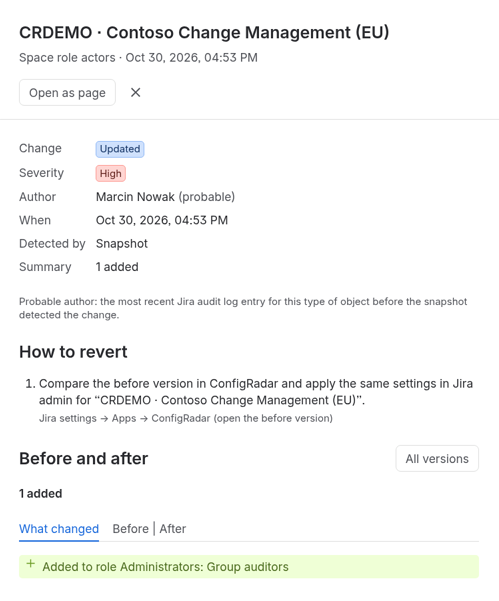
ConfigRadar takes a daily snapshot of space role actors, the people and groups in each space role, and imports the Jira audit log every hour (every six hours on Standard sites with up to 10 users), with 30 days of history on install. Both land in one change timeline. Filter Object type to Space role actors to see every space where a role gained or lost a member.
1. Open the change. The before and after view compares the two versions of the role's actor list, for example Added to role Administrators: Group auditors.
2. Read the author. When the audit log has an entry, the timeline shows its author. When only the snapshot saw the change, ConfigRadar shows a probable author: the most recent Jira audit log entry for this type of object before the snapshot detected the change. If nothing matches, the author reads Snapshot (system).
3. Check the grants. Find the space's permission scheme in the timeline or under Objects & diffs. Its diffs show each grant as the permission and its holder, for example "Browse spaces: Space role Developers", marked Added or Removed, so you can see whether the Administrators role itself gained permissions recently.
ConfigRadar never changes configuration. If the person should not be there, remove them in Space settings > People yourself; the next snapshot records the removal.
Two honest limits. Group members are snapshotted only for groups that a permission scheme uses, and audit records about user management are skipped, so a person who arrived through a group change may not show up as a role change at all. And the snapshot runs once a day, so when no audit entry exists, two changes on the same day appear as one.
What each edition adds:
- Standard: the change timeline with filters, snapshots and diffs, 90 days of history, CSV export and a weekly digest in the app.
- Advanced: watchlist rules for workflows, schemes, fields or spaces that raise an alert in the app or as a Jira work item, a view that lets space admins open ConfigRadar for their own spaces, retention from 30 to 1,095 days, and a Rovo agent with object history.
Quick answers
Where do you see who added someone to a Jira space role?
In Settings > System > Audit log, which needs Administer Jira. The log records when users are added to or removed from roles. Search for "roles changed" or the space name and read the author and the changed values. The entry can show the member list before and after, so you compare two lists to find the name that changed.
Why check what the role grants before looking for the author?
The audit entry is about membership and does not say what the role can do. Space settings > Permissions shows which permissions name the role, often including Administer spaces, and Settings > System > Space roles > View Usage lists the permission schemes, notification schemes, work item security levels and workflow conditions that use it.
What if the person came in through a group?
Then the change happened in group membership in Atlassian Administration, a different and weaker trail. For changes made in user management pages, such as adding users to groups, the audit log Author field does not show who made the change.
How does ConfigRadar show the author of a role actor change?
When the Jira audit log has an entry, the timeline shows its author. When only the daily snapshot saw the change, it shows a probable author, the most recent audit log entry for this type of object before the snapshot detected it. If nothing matches, the author reads Snapshot (system). ConfigRadar never changes configuration.